
During the appraisal period of a review cycle, managers and admins are responsible for managing peer nominations. You can approve a review cycle participant's peer nominations, remove nominations, or add peers on their behalf.
This article is relevant to: Admins and Managers
Feature: Reviews
Manage Peers for a Review Cycle Participant
- Click Reviews in Zal's main navigation.
- Select "Review Cycles" from the dropdown.
- Open the cycle you want to manage peers in.
- You'll land on the cycle's Participants page. At the top of the page, you'll see 3 reporting visuals that help you understand the current state of peer selection.
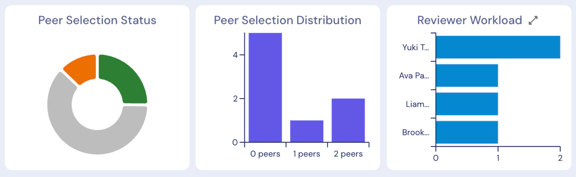
- Peer Selection Status: Shows the distribution of participants 1) who haven't nominated peers (gray), 2) who have unapproved peer nominations (orange), and 3) who have approved peer nominations (green). Use this chart to understand where you need to take action — either nudging participants to nominate peers or approving their current nominations.
- Peer Selection Distribution: Shows how many peers each employee has nominated. Use this to spot outliers and ensure no one enters the review period with too few peer reviewers.
- Reviewer Workload: Shows how many peer reviews each person has been assigned. Use this to inform approval decisions — if someone has been nominated at a disproportionate rate, you may want to guide participants to nominate someone else instead.
- Click on any chart segment to filter the participant list below to only show individuals who match that segment's criteria.
- Once you identify where you want to take action (like adding or approving a peer for a participant), click the employee's name in the participant list to open their review page.
- From the review page, you can accomplish the following tasks: adding peerings, removing peers, and approving nominations.
- To add a peer, type their name in the "Reviewers" text field and save your changes.
- To remove a peer, click the trashcan icon to the right of their name and save your changes.
- To approve peer selection, check the box next to "Approve Review Peers" and save your changes.